How to Build a No-AI-Slop Content System That Runs While You Sleep
Everyone can tell when content was made entirely by AI. The flat tone, the generic hooks, the weirdly perfect structure with nothing real in it. People scroll past it in under a second and feel vaguely annoyed they were subjected to it at all.
The problem isn't AI assistance. The problem is AI replacement — handing the whole thing over to a machine and hoping nobody notices. They notice.
The better approach is to automate the parts of content creation that are genuinely mechanical — research, ideation tracking, first drafts, posting, analytics — while keeping the parts that actually build trust in human hands. Your face. Your voice. Your ideas.
What follows is a seven-step content system designed to do exactly that.
Why This Exists: The Trust Problem
In an era where AI-generated content is everywhere, authenticity has become a genuine competitive moat. Not performative authenticity — actual, recognizable humanity on screen.
73% of viewers, according to recent research, can't distinguish high-quality AI-assisted content from human content in blind testing. But they can absolutely tell when the content is hollow. When there's no real perspective behind it. When it's technically correct but says nothing.
The system below is designed to protect against that. AI does the logistics. You do the thinking.
The Seven-Step System
Step 1: Idea Capture — Three Input Channels
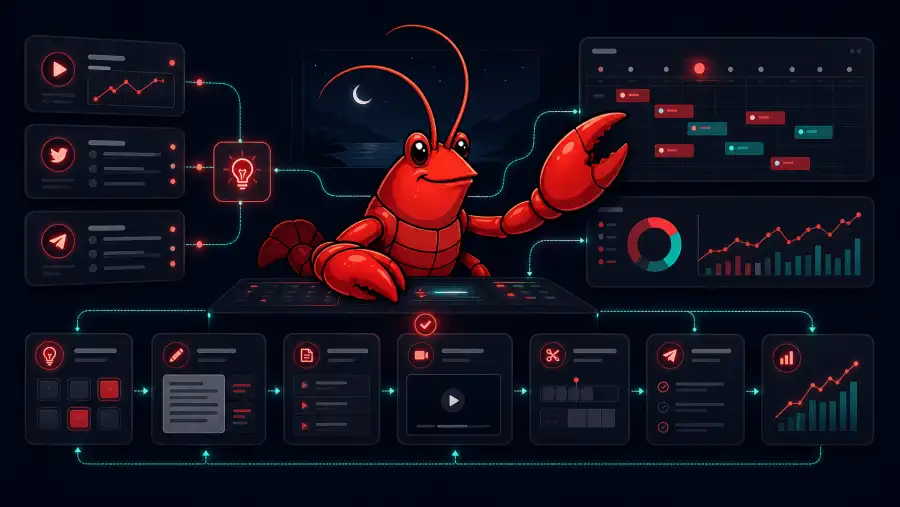
The system starts with a master ideas file that feeds from three sources simultaneously.
Automated YouTube channel tracking. A cron job runs nightly and opens a browser, visits a list of YouTube channels you've specified in a tracking file, and logs recent videos along with their view counts. You define which channels matter in your niche — competitors, inspirations, adjacent creators — and the agent monitors all of them while you sleep. Over time, you build a searchable library of what's working for others in your space.
Twitter/X forwarding. When you're scrolling and hit something that sparks an idea, you forward the post to your agent's dedicated X account. Each evening, the agent logs all forwarded posts into the ideas file with notes. This captures real-time inspiration without requiring you to stop and write anything down.
Direct Telegram capture. The simplest channel. Drop a thought into your content Telegram group any time — mid-meeting, in the shower, on a walk. The agent acknowledges it and logs it to the top of the ideas list instantly.
The result is a library of ideas you'll never exhaust, growing passively every single day.
Step 2: Weekly Planning
Once a week — Sunday evening by default — the agent reviews the full ideas library and generates a weekly content plan. It factors in performance data from the previous week's analytics (more on that in Step 7) to weight the plan toward what's been working.
You receive a Telegram notification when the plan is ready. Review it, tweak anything that doesn't feel right, and confirm. The whole process takes about five minutes.
The plan isn't just a list of topics. It includes rough angles, suggested hooks, and which platform each piece is best suited for. Because the agent has been building context on your niche for weeks, its suggestions are increasingly grounded in real signal rather than guesswork.
Step 3: Script Writing
With the weekly plan confirmed, the agent generates initial script drafts. This is where having a personal library of your own past scripts makes the system dramatically better.
Every script you've ever written gets saved in a library folder. Templates you've built. Scripts by other creators in your style that you've saved as examples. The agent writes new scripts by referencing this library — it understands your rhythm, your sentence length, how you open, how you close. The output sounds like you because it's been trained on you.
You review the draft, make adjustments, add anything that happened this week that's relevant, and finalize. The agent's first draft typically requires 10–20% modification. You're editing, not writing from scratch.
Step 4: Filming
This step is entirely human, and intentionally so.
Take out your phone. Put the script on screen. Hit record. Total time per video: roughly ten minutes.
For tutorial-style content, add a screen recording. For talking-head content, just film. The script is a guide — speak naturally, go off it when something better comes to you in the moment.
This is the step that makes the whole system work. Everything else produces leverage. This step produces authenticity. You can't automate it and you shouldn't want to.
Step 5: Editor Handoff
If you work with an editor, the handoff is fully automated. The agent uploads raw footage, the script, and any additional notes to a shared folder, then sends your editor a notification that assets are ready.
Your editor gets everything they need without a single message from you. No Slack thread asking "did you get the files?" No waiting for the upload to finish on your end. The automation handles the entire logistics layer.
If you edit yourself, you skip this step. The filing and organization still happens automatically.
Step 6: Automated Posting
Videos post automatically to YouTube, Instagram, and TikTok on the schedule you've defined. Captions, descriptions, and hashtags are generated from the script and customized per platform. Optimal posting times are applied per channel based on your historical analytics.
You don't log into three platforms. You don't copy-paste captions. You don't set reminders to post. It just happens.
Step 7: Analytics and the Feedback Loop
The system closes the loop by pulling platform analytics automatically and feeding them back into the planning step. The agent tracks view counts, engagement rates, and watch time across platforms, identifies which topics and formats are performing, and adjusts the weekly planning recommendations accordingly.
Over time, this creates a self-optimizing system. The ideas that generate the most views inform future content planning. The formats that retain viewers get used more frequently. The agent learns what works in your specific niche with your specific audience.
This is the compounding effect that makes the system more valuable the longer you run it.
What You Actually Need to Build This
The technical components are simpler than they sound:
An OpenClaw agent (or equivalent personal agent) as the orchestration layer. A YouTube channels tracking file — a markdown file with a list of channels you want monitored. A script library folder with your past work and reference scripts. A dedicated agent social account for idea forwarding. A Telegram content group with topic-specific channels. Platform API connections for automated posting (or a tool like Buffer as an alternative). An editor workflow if you use one.
The setup takes a few hours. After that, the system runs itself.
The Principle Behind It
The creators who win over the next three years won't be the ones who automate everything. They'll be the ones who figured out which parts to automate and which parts to protect.
Research: automate it. Idea tracking: automate it. First drafts: automate them. Analytics: automate them. Posting: automate it.
Your face on screen, your real perspective, your actual opinions — protect those. That's the signal in a world full of noise.
Based on a conversation with Moritz Kram on the Startup Ideas podcast.